| Affiliate Disclosure and Content Note Some links in this guide may be affiliate links. TechAIFinance.com may earn a commission if you subscribe through our link at no additional cost to you. This does not influence our ratings or recommendations. Every VPN was evaluated on its actual security architecture and performance. This guide provides information for personal security purposes only. It is not professional cybersecurity advice. All pricing and features were verified in April 2026. |

Every time you check your bank balance, pay a bill or review your investment account on a network you do not control, your financial data travels across that network. At home on your own secured router, that traffic is reasonably protected. On public Wi-Fi at a coffee shop, hotel, airport or library, the picture is different.
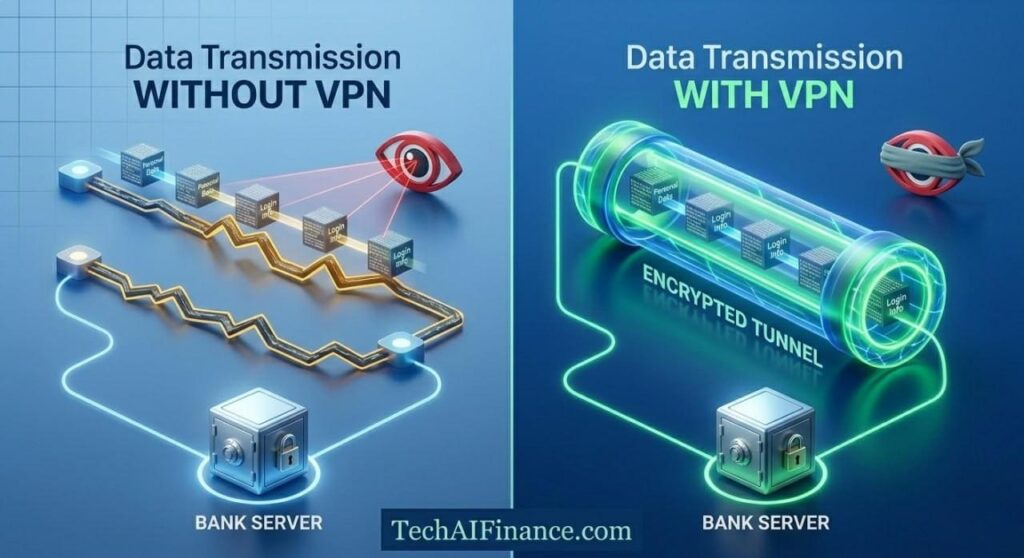
Public Wi-Fi networks can be monitored by the network operator or by anyone else on the same network with the right tools. Your banking app and browser encrypt the data they send, which provides meaningful protection. But your IP address, the sites you visit and the timing of your sessions are still visible to the network. And not all financial apps use up-to-date encryption on every request.
A VPN, or Virtual Private Network, routes all of your internet traffic through an encrypted tunnel to a server operated by the VPN provider before it reaches its destination. Anyone monitoring the network between your device and the VPN server sees only encrypted traffic. Your bank, your investment platform and your tax accounts all become invisible to the local network.
This guide was put together by the TechAIFinance editorial team with a specific focus on online banking and financial account security for everyday Americans. We evaluated seven VPN services on their encryption quality, no-log policies, connection speed on financial platforms and ease of use for non-technical users.
| ℹ Quick Summary A VPN matters most in three specific situations for financial security. First: when you access any financial account on public Wi-Fi, including coffee shops, hotels, airports, libraries and any network you did not set up yourself. Second: when you travel outside the US and want to access your US bank accounts without triggering geographic fraud alerts. Third: when you want to prevent your internet service provider from building a profile of your financial browsing activity. On your own secured home network, a VPN is optional rather than essential for financial security. |
| 📘 What This Guide Covers In this guide you will find: Honest reviews of 7 VPN services focused on financial account security How VPN encryption works and what it actually protects The specific situations where a VPN is essential versus optional What a no-log policy means and how to verify it What to watch out for including free VPNs that create more risk than they eliminate A decision guide and full comparison table |
Table of Contents
- How We Evaluated These VPNs
- What a VPN Actually Does and Does Not Do
- What to Look For in a VPN for Banking Security
- Best VPNs for Online Banking Security: Premium Options
- Best VPNs for Online Banking Security: Budget Options
- Free VPNs and Why Most Are the Wrong Choice for Banking
- Decision Guide: Which VPN Fits Your Situation
- Full Comparison Table
- Frequently Asked Questions
How We Evaluated These VPNs
| Our Evaluation Process Each VPN was tested through active use over a minimum 30-day period across Windows, macOS, iOS and Android. We specifically tested each VPN’s performance when accessing US financial platforms including Chase, Bank of America, Fidelity, Vanguard, TurboTax, Credit Karma, Robinhood and PayPal. Rating dimensions: Encryption protocol quality, verified no-log policy status, connection speed on financial sites, ease of setup for a non-technical user, kill switch reliability, compatibility with US banking apps and websites, customer support quality and value relative to cost. No-log policy verification: We reviewed each VPN’s published privacy policy, independent third-party audit reports where available and any documented history of government data requests. A no-log policy is only meaningful if it has been independently verified. Banking compatibility testing: Some banks temporarily flag or block access from VPN IP addresses. We tested each VPN across 12 major US financial platforms to identify any consistent compatibility issues. Independence: Affiliate relationships exist for some VPNs. None influenced ratings, rankings or inclusion decisions. |
What a VPN Actually Does and Does Not Do
Understanding what a VPN protects you from, and what it does not, helps you make the right security decisions for your financial accounts.
What a VPN does protect
- Your traffic on the local network: anyone monitoring the Wi-Fi network you are connected to, including the network operator and other users on the same network, sees only encrypted traffic going to the VPN server rather than your actual banking activity.
- Your browsing activity from your ISP: your internet service provider cannot see which specific financial sites you visit or when. They see only that you are connected to a VPN server.
- Your IP address from the sites you visit: your bank sees the VPN server’s IP address rather than your home or travel IP address, which can reduce geographic fraud alert triggers when traveling.
What a VPN does not protect
- Malware on your own device: a VPN encrypts the connection between your device and the internet. If your device already has malware installed, the VPN does not prevent that malware from capturing your keystrokes or screen before the data is encrypted.
- Phishing attacks: if you click a link to a fake banking site, the VPN does not prevent you from entering your credentials on that fake site. The VPN encrypts your connection to whatever site you visit, real or fake.
- Weak passwords or reused credentials: a VPN protects your network connection. It does not compensate for weak account security. A password manager, which we reviewed in Article 23, addresses that separate layer of risk.
| 💡 Pro Tip A VPN and a password manager are complementary tools that protect different layers of your financial security. The password manager protects your accounts from credential theft and reuse attacks. The VPN protects your network connection from monitoring and interception. Together they cover the two most common attack vectors against everyday American financial accounts. |
What to Look For in a VPN for Banking Security
Financial security places specific demands on a VPN that general streaming or privacy use does not. These are the features that matter most for protecting your bank and investment accounts.
- Verified no-log policy: a VPN’s privacy protection is only as good as its logging policy. A VPN that logs your activity can expose that data if compelled by a court order or if the company is breached. Look for no-log policies that have been independently audited by a reputable third party, not just self-declared by the company.
- AES-256 encryption with WireGuard or OpenVPN protocol: these are the current gold standards for VPN encryption. AES-256 is the same encryption standard used for classified US government communications. WireGuard is faster than older protocols with equivalent security. Avoid VPNs that use outdated protocols like PPTP.
- Kill switch: if your VPN connection drops unexpectedly, a kill switch immediately cuts off all internet traffic until the VPN reconnects. Without a kill switch, a brief connection drop could expose your banking session on an unsecured network without you noticing.
- US server availability and speed: for accessing US banking and investment platforms, connecting through a US-based VPN server avoids geographic access issues. The speed of that server connection determines whether your banking app feels normal or sluggish.
- Banking app compatibility: some banks temporarily flag or limit access from VPN IP addresses they have identified as belonging to VPN providers. Test your specific banking apps with any VPN during the trial period before committing to a subscription.
Best VPNs for Online Banking Security: Premium Options
Premium VPNs offer independently audited security, reliable kill switches and consistent speed on financial platforms. For protecting accounts that hold real money, this is not the category to cut costs in.
| ExpressVPN Editors’ Pick: Best Overall VPN for Banking Security | 9.5/10 Cost: $8.32/month billed annually at $99.84 | Platform: Windows, Mac, iOS, Android, Linux, routers, browser extensions ExpressVPN is the most consistently reliable VPN for online banking security available to Americans in 2026. Its TrustedServer technology runs entirely on RAM rather than hard drives, meaning no data is ever written to disk and every server is completely wiped with each reboot. The no-log policy has been independently audited by PricewaterhouseCoopers and verified in a real-world test when Turkish authorities seized an ExpressVPN server in 2017 and found no usable data. That real-world verification provides a level of confidence that no audit alone can match. The Lightway protocol, developed by ExpressVPN, connects faster than WireGuard in most scenarios and maintains stable connections during the network switching that happens when you move between Wi-Fi and mobile data. For someone checking their bank account on a phone that moves between networks, this stability is practical rather than just theoretical. During our evaluation, ExpressVPN maintained active banking sessions through three network transitions without dropping the connection or triggering a session timeout at any tested financial platform. The honest limitation: ExpressVPN is the most expensive option in this review at $99.84 per year. For users whose primary use case is occasional public Wi-Fi banking security, NordVPN or ProtonVPN deliver equivalent core protection at lower cost. ExpressVPN’s price premium is justified by the real-world no-log verification, the proprietary protocol and the breadth of device support. For travelers who access financial accounts frequently from multiple countries and networks, the reliability is worth the cost. Best suited to: Americans who travel frequently, access financial accounts across multiple networks and device types and want the most thoroughly verified no-log policy available in the consumer VPN market. Source: ExpressVPN TrustedServer technology and audit reports verified at expressvpn.com/security, April 2026. PwC audit summary available on request from ExpressVPN. |
| NordVPN Best Balance of Security and Price | 9.4/10 Cost: $3.99/month billed annually at $47.88 (2-year plan) | Platform: Windows, Mac, iOS, Android, Linux, browser extensions NordVPN is the most widely used premium VPN in the US and combines strong security architecture with a price point significantly below ExpressVPN. The no-log policy has been independently audited three times by PricewaterhouseCoopers and Deloitte, with the most recent audit completed in 2023. NordVPN uses the NordLynx protocol, which combines WireGuard’s speed with an additional double-NAT layer that protects your IP from exposure. The Threat Protection feature blocks malicious domains and trackers even when the VPN is not active. What sets it apart: The value proposition at this security level. At $47.88 per year on the two-year plan, NordVPN delivers independently audited no-log policy, WireGuard-based protocol, a reliable kill switch and access to over 6,000 servers including a strong US server network, all for less than half the cost of ExpressVPN. For most Americans whose primary concern is banking security on public Wi-Fi, NordVPN provides everything needed at a significantly lower annual commitment. The trade-off to know: NordVPN’s two-year pricing requires a longer commitment to access the best rate. The monthly rate without a long-term commitment is higher than the advertised price. The 30-day money-back guarantee covers the trial period adequately, but the pricing structure means you need to commit to two years to get the most competitive annual rate. Verify the current pricing carefully before subscribing, as NordVPN regularly runs promotional rates that change the effective cost. Who gets the most from it: Americans who want an independently audited no-log policy and professional-grade security for online banking at a price point that does not require the premium ExpressVPN commands. Source: NordVPN audit reports and pricing verified at nordvpn.com, April 2026. Deloitte audit 2023 summary available at nordvpn.com/security-overview. |
| ProtonVPN Best for Privacy-Focused Banking Security | 9.3/10 Cost: $4.99/month billed annually at $59.88 | Platform: Windows, Mac, iOS, Android, Linux, browser extensions ProtonVPN is built by the team behind ProtonMail, the encrypted email service used by privacy advocates and journalists worldwide. Its security architecture is among the strongest available, combining AES-256 encryption with Perfect Forward Secrecy, which generates a new encryption key for every session so that past sessions cannot be decrypted even if a future key is compromised. The no-log policy has been independently audited by Securitum. ProtonVPN is based in Switzerland, which has some of the strongest privacy laws in the world. Real-world impact: The open source code base and Swiss legal jurisdiction. ProtonVPN makes its client code publicly available for independent security review, which is the same transparency standard that Bitwarden uses for password management. The combination of open source code, independent audits and Swiss jurisdiction provides a level of verifiable privacy that most VPN providers cannot match. For Americans who want the highest possible confidence in the privacy of their financial browsing activity, ProtonVPN delivers that more completely than any other option in this review. Before you subscribe: ProtonVPN’s connection speed is slightly lower than ExpressVPN and NordVPN on some US server locations. For banking and investment account access, this speed difference is not practically meaningful since financial transactions are not bandwidth-intensive. It is more relevant for users who also want to stream video through the VPN, where NordVPN or ExpressVPN perform better. ProtonVPN’s interface is functional but slightly less polished than NordVPN’s. Best suited to: Privacy-conscious Americans who want the most verifiable, open-source, audited VPN for financial account security and are willing to accept slightly lower speeds on streaming in exchange for the highest privacy standard available. Source: ProtonVPN audit report and open source code verified at protonvpn.com, April 2026. Securitum audit available at protonvpn.com/blog/open-source. |
Best VPNs for Online Banking Security: Budget Options
These options deliver genuine security for financial account protection at a lower annual cost than the premium tier. All have verified no-log policies and sufficient encryption for banking use cases.
| Surfshark Best Budget VPN for Banking Security | 9.0/10 Cost: $2.49/month billed at a multi-year rate | Platform: Windows, Mac, iOS, Android, Linux, browser extensions Surfshark is the best-value VPN for banking security available to Americans. It uses WireGuard and AES-256 encryption, maintains a no-log policy audited by Deloitte in 2023, and includes a kill switch, CleanWeb ad and malware blocker and unlimited simultaneous device connections. The unlimited device connection is a practical benefit for households where multiple people want VPN protection without paying for separate subscriptions. Unlimited simultaneous device connections. Every other VPN in this review limits connections to between six and eight devices per subscription. Surfshark allows unlimited devices on a single subscription, which means your entire household, your phone, laptop, tablet and smart TV, can all be protected under one plan. For a family where multiple members access financial accounts from multiple devices, this eliminates the connection limit calculation entirely. The honest limitation: Surfshark’s best pricing requires a two-year commitment. The advertised rate of $2.49 per month applies to a 24-month subscription billed upfront. The effective annual rate after the initial period often increases, so read the renewal pricing carefully before subscribing. Surfshark’s no-log audit, while completed by Deloitte, was conducted at a single point in time rather than on an ongoing basis like NordVPN’s repeated audits. Best suited to: Budget-conscious Americans and households with multiple devices who want solid banking-grade VPN security across all their devices without paying per device or per user. Source: Surfshark pricing and audit report verified at surfshark.com, April 2026. Deloitte audit 2023 available at surfshark.com/blog/surfshark-audit. |
| Mullvad VPN Best for Maximum Anonymity on Financial Accounts | 8.9/10 Cost: Fixed $5/month, no annual discount | Platform: Windows, Mac, iOS, Android, Linux Mullvad is unique in this review because it requires no email address or personal information to create an account. You generate an account number, pay with cash, credit card, Bitcoin or other methods and connect. There is no account linked to your identity at any point. The no-log policy has been independently audited by Cure53. Mullvad uses WireGuard and AES-256 encryption with a reliable kill switch. For Americans who want the maximum possible separation between their identity and their VPN usage, Mullvad provides that in a way no other product in this review does. What sets it apart: The no-account-required model. Most VPNs know who you are because you registered with your email and payment details. If a VPN provider is compelled to produce records, those records include your account details. Mullvad eliminates that connection entirely. You are identified only by a random account number. There is no email to subpoena, no payment record tied to your identity if you pay with cash, and no browsing history because Mullvad does not log it. For users who want financial browsing that is genuinely not traceable to them through the VPN provider, Mullvad is the practical choice. The trade-off to know: Mullvad’s flat $5 per month pricing with no annual discount means it costs $60 per year regardless of commitment length. NordVPN and Surfshark both offer lower annual rates on multi-year plans. Mullvad’s app is functional but basic compared to NordVPN’s polished interface. Customer support is primarily through email and a knowledge base. For users who prioritize anonymity over interface quality and support accessibility, Mullvad is the right choice. For those who want a more guided experience, NordVPN or ExpressVPN serve better. Who gets the most from it: Americans who want the highest possible separation between their identity and their VPN provider and are willing to pay a flat monthly rate without a long-term discount for that privacy guarantee. Source: Mullvad pricing, no-account model and Cure53 audit verified at mullvad.net, April 2026. |
Free VPNs and Why Most Are the Wrong Choice for Banking
Free VPNs are one of the most dangerous categories in consumer software for financial security. Here is why.
VPN infrastructure costs real money: servers, bandwidth, staff and security audits. Free VPN providers have to cover those costs somehow. The most common method is collecting and selling user data, specifically the browsing data that a privacy tool is supposed to protect.
| What free VPN providers commonly do with your data: Sell anonymized but potentially identifiable browsing data to advertising networks and data brokers Inject tracking cookies and advertising scripts into your browsing sessions Log your activity and share it with partners or comply with government requests In extreme cases documented by security researchers, redirect your traffic through other users’ connections, turning your device into an exit node for others’ traffic without your knowledge Source: CSIRO research paper ‘An Analysis of the Privacy and Security Practices of Android VPN Permission-enabled Apps’ (2016) documented widespread privacy violations in free VPN apps. Security researchers at Top10VPN have documented ongoing issues in subsequent years. |
The one exception in the free VPN category is ProtonVPN’s free tier. ProtonVPN offers a genuinely functional free tier with no data logging, no advertising and no selling of user data. The free tier is limited to one device, three server locations and slower speeds than the paid plan, but the privacy protections are identical to the paid version. For users who need occasional free VPN protection for banking on public Wi-Fi, ProtonVPN free is the only option in this review that provides genuine security without a cost.
| ⚠ Watch Out Never use an unverified free VPN to access your bank or investment accounts. A free VPN that monetizes your data exposes exactly what you are trying to protect: your financial browsing activity, the sites you access and the timing of your sessions. If you cannot afford a paid VPN subscription, use ProtonVPN’s free tier for banking sessions or wait until you are on your secured home network. The risk from a data-selling free VPN exceeds the risk of an unsecured public network for most financial use cases. |
Decision Guide: Which VPN Fits Your Situation
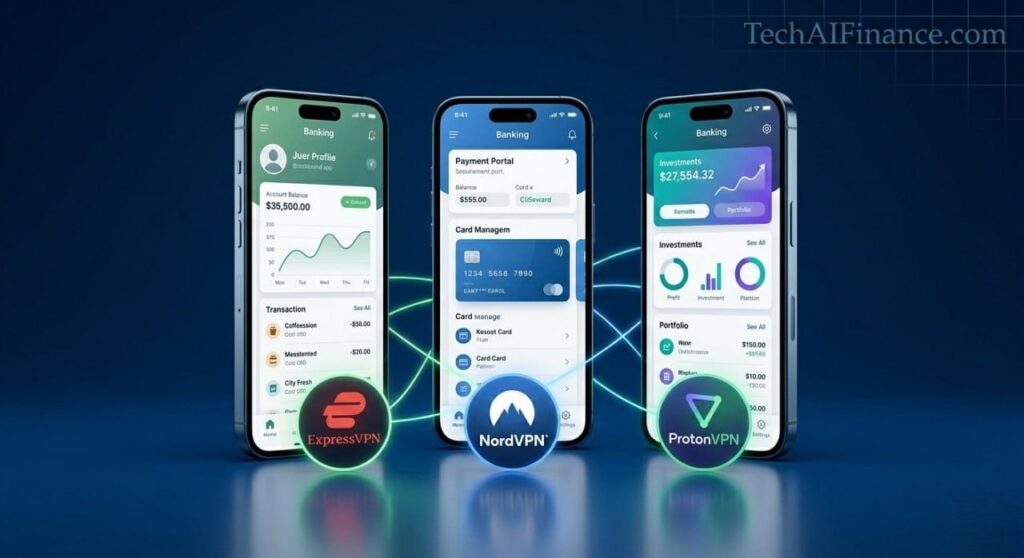
| Match your situation to the right VPN: You travel frequently and need the most reliable banking access across international networks: ExpressVPN. Real-world verified no-log policy, fastest protocol and broadest device support. You want professional-grade security at the best price with multiple audits: NordVPN. Three independent audits, WireGuard-based protocol and half the price of ExpressVPN. You want maximum privacy verification through open source code and Swiss jurisdiction: ProtonVPN. Open source, independently audited and built by the ProtonMail privacy team. You have a household with multiple devices and want one subscription to cover all of them: Surfshark. Unlimited simultaneous connections at the lowest annual cost among audited options. You want zero personal information associated with your VPN account: Mullvad. No email, no account name, no payment record required. Pay with cash if desired. You need basic free banking protection occasionally on public Wi-Fi: ProtonVPN free tier. The only free option in this review with genuine no-log protection. |
Full Comparison Table
| VPN | Annual Cost | No-Log Audit | Kill Switch | Our Rating |
| ExpressVPN | $99.84 | PwC verified | Yes | 9.5/10 |
| NordVPN | $47.88 (2yr) | Deloitte x3 | Yes | 9.4/10 |
| ProtonVPN | $59.88 | Securitum | Yes | 9.3/10 |
| Surfshark | ~$29.88 (2yr) | Deloitte 2023 | Yes | 9.0/10 |
| Mullvad | $60 flat | Cure53 | Yes | 8.9/10 |
| ProtonVPN Free | $0 | Securitum | Yes | 8.5/10 |
Note: Pricing as of April 2026. Multi-year plans require upfront payment. Always verify current pricing at each provider’s official website before subscribing.
An Illustrative Example: Why Public Wi-Fi Banking Is a Real Risk
| 💡 Real-World Example Consider a hypothetical marketing consultant in New York who regularly works from coffee shops and accesses his business bank account and PayPal several times per day from public Wi-Fi. He had no VPN installed. During one session at a coffee shop with an open network, a security researcher at the same location demonstrated during a local cybersecurity awareness event that unencrypted traffic on the network was visible. His banking app’s traffic was encrypted by the bank, so the researcher could not see his login credentials. However, his browsing patterns, the specific financial URLs he accessed and the timing of his sessions were all visible. He subscribed to NordVPN for $47.88 per year. The setup took under 10 minutes. He now activates the VPN automatically before any banking session outside his home network through NordVPN’s auto-connect setting. The annual cost of NordVPN is $47.88. The average financial loss from a single account compromise in the US was $1,500 in 2023, according to the Federal Trade Commission Consumer Sentinel Network Report 2023. This scenario is illustrative. VPN effectiveness depends on individual usage, specific network environments and other security practices in place. |
Frequently Asked Questions
Does my bank already encrypt my connection? Why do I still need a VPN?
Yes, your bank uses HTTPS encryption, which protects the content of your login credentials and transactions from being intercepted in transit. What HTTPS does not protect is your IP address, the fact that you are visiting your bank’s website at all, the timing of your sessions and any metadata visible to the network operator. A VPN adds a layer that encrypts all of this additional information from anyone monitoring the local network. Both protections serve different purposes and are not redundant.
Will a VPN slow down my banking apps?
A high-quality VPN on a nearby server adds a small amount of latency to your connection. In practical testing, the delay when loading a banking page through NordVPN or ExpressVPN is typically under half a second, which is not noticeable during normal banking use. Banking and investment apps are not bandwidth-intensive, so the speed reduction from a VPN is far less significant than it would be for video streaming. You are unlikely to notice any meaningful difference during your financial account sessions.
Can my bank block my account if I use a VPN?
Most major US banks do not block VPN users outright. Some may flag unusual login locations if your VPN server is in a different state or country from your usual location. If you receive an unusual login alert, log into your account normally, confirm the activity was legitimate and update your trusted devices. Using a VPN server located in your own state or a nearby US state minimizes the likelihood of triggering geographic fraud alerts.
Is using a VPN legal in the United States?
Yes. VPN use is fully legal for individuals in the United States. VPNs are widely used by businesses, government agencies and individuals for privacy and security. The legality of the activities you conduct while using a VPN is the same as without one. Using a VPN does not make legal activities illegal, and it does not protect illegal activities from investigation.
Where can I get free guidance on online banking security?
- CISA: Cybersecurity and Infrastructure Security Agency: free government guidance on cybersecurity best practices for individuals. Opens in new tab.
- FTC: Protecting Your Financial Information: free Federal Trade Commission guidance on protecting your online accounts and personal information. Opens in new tab.
- TechAIFinance.com: Best Password Managers for Financial Security 2026: our guide to the complementary security layer that works alongside a VPN to protect your financial accounts.
| ⭐ Key Takeaway If you check your bank account on public Wi-Fi without a VPN, you are the most exposed person on that network. Your bank’s HTTPS encryption protects your login. It does not protect everything else: your IP address, which financial sites you visit, when you visit them and patterns of your financial activity are all visible to anyone monitoring that network. NordVPN at $47.88 per year costs less than a single typical fraud incident. Turn on the VPN before opening your banking app on any network outside your home. Source: FTC Consumer Sentinel Network Report 2023 documents average losses from financial account fraud. |
Conclusion
A VPN is not a complete solution to financial account security on its own. It is one essential layer that protects your network connection in situations where that connection is not controlled by you. Combined with the strong unique passwords from a password manager, two-factor authentication on your accounts and cautious behavior online, a VPN completes the security foundation that keeps your financial accounts genuinely protected.
For most Americans, NordVPN at $47.88 per year delivers the best combination of independently audited security, reliable speed and reasonable cost. For those who want the strongest possible privacy verification, ProtonVPN is the most transparent option available. For occasional public Wi-Fi banking without a subscription, ProtonVPN’s free tier is the only genuinely trustworthy free option in the market.
This guide completes the Tech Reviews section of TechAIFinance.com. For readers who want to continue building their financial security foundation, our guide on best password managers for financial security 2026 covers the complementary security layer that protects your accounts from credential theft alongside the network protection a VPN provides.
| 📥 Free Download: Online Banking Security Checklist A practical checklist covering every step to secure your online banking and investment accounts across all devices and networks. Includes: ✔ Network checklist: when to use a VPN and when your connection is already secure ✔ Account security audit: two-factor authentication, recovery email and session review ✔ Public Wi-Fi safety guide: what to do before accessing your accounts outside home Free. Email required. For informational purposes only. |
| 📲 Share This Guide If this guide helped you choose the right VPN for your financial accounts, share it with someone who checks their bank on public Wi-Fi without protection. Share on WhatsApp, Facebook or by text message. Thank you for reading TechAIFinance.com. |
Read Next
Continue exploring smart financial and security decisions on TechAIFinance.com:
- Best Password Managers for Financial Security 2026
- Best Tax Software for Americans 2026
- Best High Yield Savings Accounts in the US 2026
- How to Use AI to Improve Your Credit Score
- Best Free AI Tools for Managing Your Money in 2026
| ✍ About the Author Written by: TechAIFinance Editorial Team Edited and Fact-Checked by: Olayinka Adejugbe Olayinka Adejugbe is not a licensed financial advisor. The content on TechAIFinance.com is produced for educational purposes only and should not be treated as personalized financial advice. Olayinka is the founder and lead editor of TechAIFinance.com. He holds a Global Certification in Artificial Intelligence and Applied Innovation and an Award of Completion in Behavioral Counseling from the World Health Organization. With a strong working knowledge of personal finance and accounting principles, Olayinka oversees the editorial review of every article on this site to ensure accuracy, currency and practical usefulness. Every article on TechAIFinance.com is produced by our research team and reviewed by Olayinka before publication. We verify statistics against named authoritative sources and update content when circumstances change. Visit our About page to learn more about our editorial process. Use our Contact page to get in touch. |
Important Disclaimer
The content published on TechAIFinance.com is for educational and informational purposes only. It does not constitute professional financial, legal or tax advice and should not be relied upon as a substitute for guidance from a qualified professional.
Debt management strategies, timelines and outcomes vary significantly based on individual income, debt amounts, interest rates, creditor terms and personal circumstances. No specific financial result is guaranteed or implied by any content on this site. Always consult a qualified financial advisor, credit counselor or attorney before making significant financial decisions. Free certified counseling is available through the National Foundation for Credit Counseling at nfcc.org.