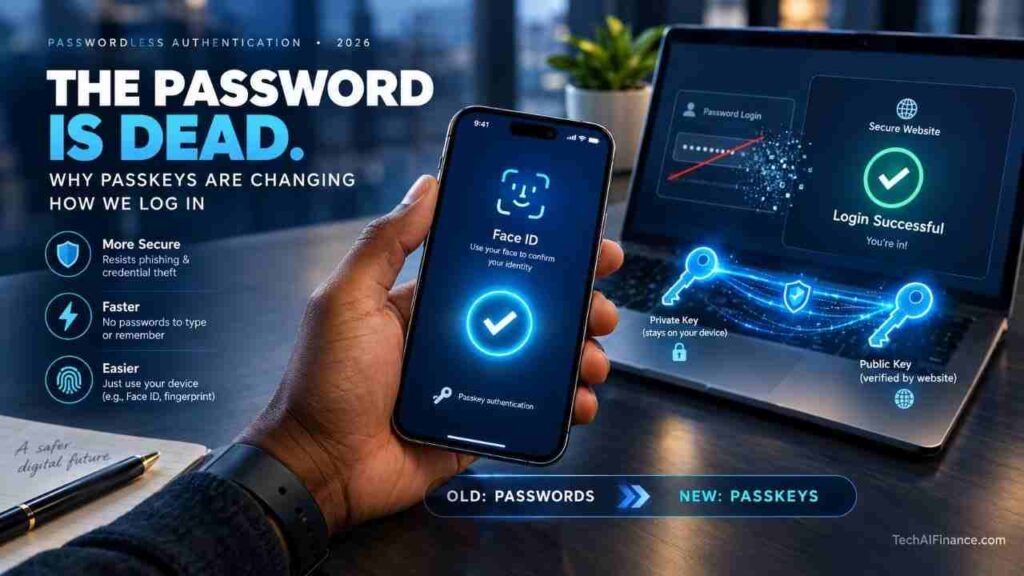
Somewhere in the last year or two, you’ve probably seen a login screen offer to “create a passkey instead” and clicked past it without really knowing what you were skipping. That’s a fair reaction. Passwords have been the default for so long that an alternative sounds like a hassle, even when the screen promises it’s faster.
Passkeys are not a stronger password, a new kind of PIN, or another app to install. They’re a fundamentally different way of proving who you are to a website, built on the same public-key cryptography that already secures things like HTTPS connections. Once set up, there’s no password to type, remember, or have stolen in a breach, because there’s no shared secret sitting on a company’s server for hackers to steal in the first place.
This guide breaks down what a passkey actually is, how the cryptography works in plain terms, where they’re supported right now, and where they still fall short. No card format here since there’s no single product to review, just a technology worth understanding before your bank, your email provider, or your employer starts pushing you toward it.
| ℹ Quick Summary An estimated 5 billion passkeys are now in active use worldwide, with 90 percent consumer awareness and 75 percent of people having enabled a passkey on at least one account, per the FIDO Alliance’s State of Passkeys 2026 report.Stolen or compromised credentials factored into 39 percent of breaches across the full attack chain, per the Verizon Data Breach Investigations Report 2026.Over 150 million Americans now use some form of two-factor authentication, per the Duo Security State of the Auth Report 2026.SMS-based two-factor authentication is roughly 40 times less secure than an authenticator app or passkey, per Google Security Research 2025.The Cybersecurity and Infrastructure Security Agency lists phishing-resistant multi-factor authentication, the category passkeys belong to, as a top recommended control against account takeover, per CISA 2026. |
| 📘 What This Guide Covers What a passkey actually is, in plain language, without the cryptography jargon How the technology works under the hood, and why there’s no password for hackers to steal Why passkeys resist phishing in a way passwords and SMS codes simply can’t Where passkeys work today, from Apple and Google accounts to major U.S. banks How passkeys stack up against passwords and authenticator apps side by side How to set up your first passkey in under five minutes What happens if you lose the phone your passkeys are tied to Straight answers to the most common passkey questions |
Table of Contents
1. What Is a Passkey?
2. How Passkeys Actually Work
3. Why Passkeys Resist Phishing
4. Where Passkeys Work Today
5. Passkeys vs. Passwords vs. Authenticator Apps
6. Setting Up Your First Passkey
7. Comparison Table
8. Real-World Example
9. Frequently Asked Questions
10. Key Takeaway
11. Conclusion
What Is a Passkey?
| A passkey is a pair of mathematically linked cryptographic keys that replace a password for logging into an account. One key, the private key, never leaves your device or password manager. The other, the public key, is stored by the website or app you’re signing into. Because the private key never travels over the internet, there’s nothing for a hacker to intercept or steal from a server breach the way a password database can be stolen. |
Passkeys were developed under the FIDO Alliance and the W3C’s WebAuthn standard, the same coalition responsible for physical security keys like YubiKeys. Apple, Google, and Microsoft all committed to the standard in 2022, which is why passkey support arrived on iPhones, Android phones, and Windows PCs within roughly the same window rather than one company going it alone.

How Passkeys Actually Work
| When you create a passkey, your device generates a unique key pair for that specific website. To log in later, the site sends a random challenge, your device signs it with the private key using your fingerprint, face, or screen lock to unlock that key, and the site verifies the signature with the public key it already has. Nothing you type or say is ever transmitted, which is the core difference from a password. |
This is worth sitting with for a second: your fingerprint or face scan never leaves your device either. It’s only used locally to unlock the private key that’s already sitting in your phone’s secure hardware. A company’s servers never see your biometric data, only a cryptographic signature proving you unlocked the correct key.
Why Passkeys Resist Phishing
| A passkey is cryptographically bound to the exact website domain it was created for. If you land on a lookalike phishing site at a slightly misspelled domain, your device simply won’t offer up a matching passkey, because the domain doesn’t match. This is structurally different from a password or an SMS code, which you can be tricked into typing into a fake page no matter how convincing the illusion is. |
That distinction matters more than it might sound. Stolen or compromised credentials still factored into 39 percent of breaches in the latest Verizon DBIR, and SMS-based codes remain roughly 40 times less secure than an authenticator app or passkey according to Google’s own security research, largely because both a password and a text message can be phished, forwarded, or intercepted by a convincing fake page. A passkey structurally can’t be handed over by a confused or rushed user the way those older methods can.
Where Passkeys Work Today
| Passkey support has moved well past early adopters. Apple, Google, and Microsoft accounts all support them natively, along with major platforms like Amazon, PayPal, eBay, and a growing list of U.S. banks and credit unions rolling out passkey login for online banking. Roughly 48 percent of the world’s top 100 websites now offer passkeys as a login option, more than double where that figure stood in 2022. |
Adoption isn’t universal yet, and that’s the honest caveat. Most sites still keep passwords running in parallel as a fallback, and a meaningful share of organizations still rely on older, phishable sign-in methods as their primary option. If a site you use doesn’t offer a passkey yet, an authenticator app remains the strongest fallback available.
Passkeys vs. Passwords vs. Authenticator Apps
| Passwords rely on a secret you memorize and a company stores, which makes them vulnerable to both phishing and server breaches. Authenticator apps add a rotating six-digit code on top of a password, which blocks basic credential theft but can still be phished by a fast-moving fake login page. Passkeys remove the shared secret entirely and bind the credential to the real website domain, closing both gaps at once. |
| 💡 Pro Tip You don’t have to choose one account security method for everything at once. Start by adding a passkey to your Google, Apple, or Microsoft account, since those are the accounts most likely to unlock everything else if they’re ever compromised, then expand to banking and email as more sites add support. |
Setting Up Your First Passkey
The exact steps vary slightly by platform, but the general pattern is the same everywhere: go to your account’s security settings, look for “Passkeys” or “Sign-in options,” and choose to create one. Your device will prompt for Face ID, Touch ID, Windows Hello, or your screen lock, and the passkey is created in seconds with no password to invent or write down.
If you use a password manager like 1Password or Bitwarden rather than relying on your phone or laptop alone, passkeys created through the manager sync across your devices the same way saved passwords already do, which solves some of the device-loss concerns covered in the FAQ below.
Comparison Table
| Method | Phishing-Resistant | Shared Secret to Steal | Typical Setup Time | Best For |
| Password Alone | No | Yes, stored on server | 1-2 minutes | Nothing. Weakest option available |
| Password + SMS Code | No | Yes, plus a phishable code | 2-3 minutes | Better than nothing, still risky |
| Password + Authenticator App | Partial | Yes, password can still leak | 3-5 minutes | Sites without passkey support |
| Passkey | Yes | No shared secret at all | Under 1 minute | Any account that offers it |
| Physical Security Key | Yes | No shared secret at all | 5-10 minutes setup | High-risk accounts, journalists, admins |
Real-World Example
| Carla Jensen, a nurse in Denver, Colorado, switched her Gmail and bank login to passkeys after her sister’s email was compromised through a reused password following an unrelated data breach. Setup took about ten minutes total across both accounts, and she no longer worries about which old password might be sitting in a leaked database somewhere. Marcus Webb, a small business owner in Providence, Rhode Island, nearly fell for a phishing email that perfectly copied his bank’s login page. When he tapped the link, his phone didn’t offer his banking passkey at all, because the fake domain didn’t match the real one his passkey was created for. That mismatch was the first clue something was wrong, well before he noticed anything else off about the page. These examples are illustrative. Actual results depend on individual circumstances. |
Frequently Asked Questions
Do I still need a password if I set up a passkey?
Most sites keep a password as a fallback option during the transition period, but you won’t need to enter it once a passkey is set up. Some sites are beginning to let you remove the password entirely, though that option isn’t universal yet.
What happens if I lose the phone my passkeys are stored on?
If your passkeys are backed up through iCloud Keychain, Google Password Manager, or a password manager like 1Password or Bitwarden, they sync to your new device once you sign back into that service. If a passkey was only stored on a single device with no backup enabled, you’d need to use another registered method to regain access and create a new one.
Can a passkey be stolen the way a password can?
Not in the same way. There’s no password database entry to steal, since the private key never leaves your device or password manager. The realistic risk shifts to someone gaining physical access to an unlocked device or compromising the password manager account that stores the synced passkeys.
Do all websites support passkeys yet?
No. Roughly 48 percent of the world’s top 100 websites currently offer passkeys as an option, and most keep passwords running in parallel as a fallback. Check your account’s security or sign-in settings to see if it’s available yet.
Is a passkey the same thing as two-factor authentication?
Not exactly. Two-factor authentication typically pairs a password with a second step like a code. A passkey replaces the password itself and already combines something you have (your device) with something you are (your biometric unlock), so it functions like strong multi-factor authentication in a single step.
Can I use the same passkey on my Windows PC and my iPhone?
Yes, if it’s stored in a cross-platform password manager like 1Password or Bitwarden, or if you scan a QR code to use your phone as the authenticator for a sign-in on a different device. Passkeys stored only in Apple’s iCloud Keychain or Google Password Manager sync most easily within that same ecosystem.
| ⭐ Key Takeaway A passkey replaces your password with a cryptographic key pair that never leaves your device, which means there’s no shared secret for a hacker to steal in a breach and no fake login page that can trick it into handing itself over. Start with your Apple, Google, or Microsoft account, since those tend to unlock everything else if compromised, then add passkeys to banking and other sensitive accounts as more sites roll out support. |
Conclusion
Passkeys aren’t a marginal upgrade to how you log in, they remove the entire category of risk that comes from having a secret worth stealing in the first place. Adoption still has real gaps, with plenty of sites keeping passwords running as a fallback, but the direction is clear: five billion passkeys now in active use worldwide is not a niche security feature anymore, it’s quietly become the default for a large share of everyday logins.
If passkeys aren’t available yet for one of your accounts, an authenticator app is your strongest fallback. See our guide to the best authenticator apps for Americans in 2026, and pair it with our breakdown of the best password managers for Americans in 2026 to keep the accounts that don’t support passkeys yet just as secure.
| 📲 Share This Guide Know someone still reusing the same password across a dozen sites? Send them this guide before their next login turns into a breach headline. |
Read Next
- How to Get Your Free Annual Credit Report in the US 2026
- Credit Freeze vs Credit Lock: What Every American Needs to Know in 2026
- What to Do After a Data Breach: A Step-by-Step Guide for Americans 2026
- Credit Score Ranges Explained: What Your Number Means for Americans in 2026
| ✍ About the Author Written by: TechAIFinance Editorial Team Edited and Fact-Checked by: Olayinka Adejugbe Olayinka Adejugbe is not a licensed financial advisor. The content on TechAIFinance.com is produced for educational purposes only and should not be treated as personalized financial advice. Olayinka is the founder and lead editor of TechAIFinance.com. He holds a Global Certification in Artificial Intelligence and Applied Innovation and an Award of Completion in Behavioral Counseling from the World Health Organization. With a strong working knowledge of personal finance and accounting principles, Olayinka oversees the editorial review of every article on this site to ensure accuracy, currency and practical usefulness. Every article on TechAIFinance.com is produced by our research team and reviewed by Olayinka before publication. We verify statistics against named authoritative sources and update content when circumstances change. Visit our About page to learn more about our editorial process. Use our Contact page to get in touch. |
Disclaimer & Content Note
The information provided on TechAIFinance.com—including content on personal finance, side hustles, AI tools, and tech reviews is for educational and informational purposes only and does not constitute professional financial, legal, tax, or technical advice. Financial outcomes, business earnings, and tech performance vary based on individual circumstances and market conditions. TechAIFinance.com makes no guarantees regarding results or tool performance. Always consult a qualified professional before making major financial, business, or tech purchasing decisions. Free certified credit counseling is available through the National Foundation for Credit Counseling at nfcc.org.